Fast parts lookup
Search part numbers, OEM numbers, brands, names or barcodes from one box.
PartPilot keeps every part, bin, fitment, sale, return and invoice in one simple system - so your team can answer customers fast and your stock numbers stay trustworthy.
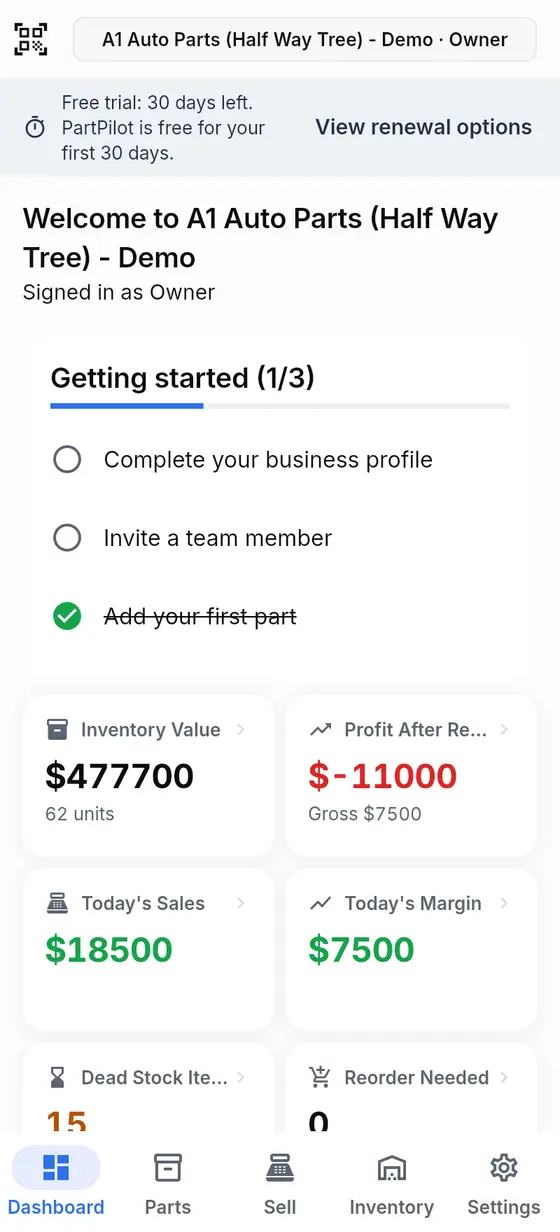
One system from stockroom to sales counter
PartPilot replaces the memory, notebooks and scattered spreadsheets that make a simple stock question harder than it should be.
Search part numbers, OEM numbers, brands, names or barcodes from one box.
Filter stock by year, make and model, then see how confidently each fit is verified.
Know the store, shelf and bin for every unit, even when a new staff member is on counter.
Receive, look up, count and move parts with the Android camera - no special scanner needed.
Staff can sell without seeing costs. Managers control stock; owners control the business.
Refunds and return shipping flow into the number that tells you what the shop actually kept.
A single morning glance shows stock value, today's sales, true margin after returns, dead stock and reorder needs.
Your team always knows what to do next - and every movement leaves a useful record behind.
Add your business profile, locations and easy-to-read bins such as A1, A2 and Yard.
Enter parts as you go or import an existing Excel list with column matching and an error report.
Scan or search at the counter. Receive deliveries to the right bin and let stock update itself.
Watch margin, returns, dead stock and reorder alerts before they become expensive surprises.
This sample workspace mirrors a small Jamaican parts shop: busy counter, mixed inventory, cash sales and parts spread across shelves and bins.
Start with the complete system. No stripped-down free tier, no surprise charge and no card required to test it.
Everything an independent parts shop needs to control stock and run a faster counter.
Still unsure? Reach out directly and we can walk through your current inventory process.
Ask on WhatsAppNo. Staff can look up parts, check fitment, sell and receive stock without seeing unit costs or profit. Those numbers remain available to owners and managers.
No. You can import an existing Excel list, match its columns and fix only the rows identified in the import error report.
The Android app is designed for offline counter work. Keep selling and receiving, then let changes sync when the connection returns. Just stay signed in while offline.
No. Use the Android phone camera for scanning, or search and post movements manually from the web or mobile app.
You can renew directly during the beta. Nothing renews or charges behind your back, and the workspace becomes read-only if the trial and grace period end without renewal.
Try PartPilot with your real shop for 30 days. Add a few parts, run a counter sale and see the difference for yourself.